Accelerate Threat Detection and Response with IBM QRadar Suite
Overview
IBM QRadar Suite provides comprehensive security operations capabilities for threat detection, investigation, response, and automation across hybrid environments. Built for modern SOC teams, it combines SIEM, SOAR, EDR, and threat intelligence to help organizations detect threats faster and streamline incident response. Integrating with IBM QRadar extends visibility across your security ecosystem while enabling efficient investigation, response orchestration, and operational resilience.
Key Products
IBM QRadar SOAR
Orchestrates and automates incident response processes using dynamic playbooks, providing a centralized hub where security and IT teams collaborate across the organization to resolve cyber incidents rapidly.
IBM QRadar SIEM
Ingests, parses, normalizes, correlates, and analyzes high-volume log and event data from across your environment to surface real-time threats and high-fidelity actionable alerts.
IBM Security Threat Investigator
Automatically evaluates and investigates active alerts and cases using AI, executing root-cause analysis across your security footprint to deliver decisive context to analysts.
IBM QRadar EDR
Protects endpoints against previously unknown zero-day attacks and anomalies using hundreds of automated machine learning and behavioural models to detect and block threats in near real-time.
IBM Guardium Data Protection
Safeguards sensitive enterprise data across databases, cloud platforms, and hybrid environments by discovering vulnerabilities, tracking data access patterns, and automating compliance reporting.

IBM Verify
Modernizes identity security and access management using AI-powered identity threat detection and response (ITDR) to ensure only authorized users, machines, and applications can access your systems.
IBM QRadar Suite Integration Architecture
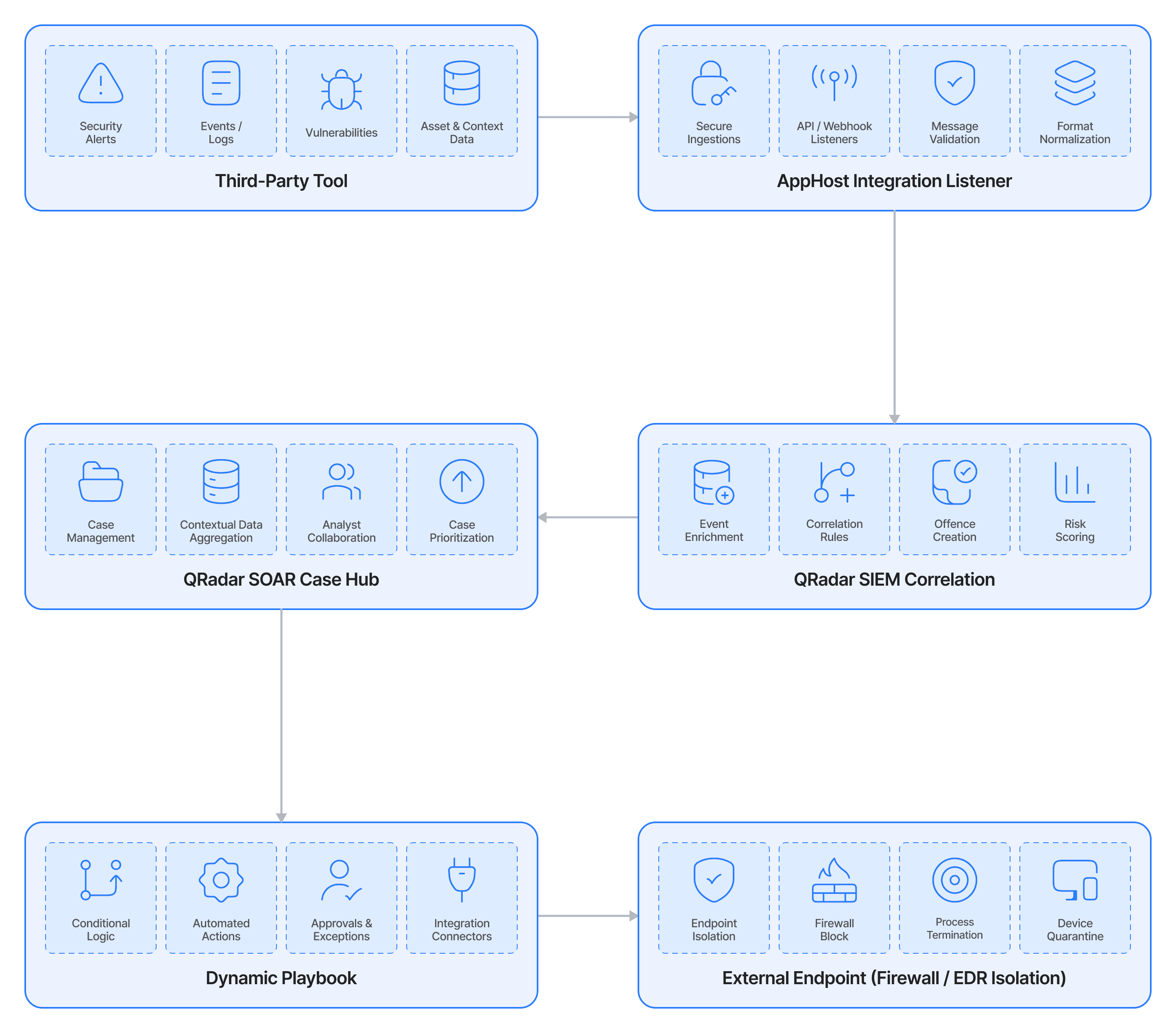
Data moves securely between your third-party tools and IBM using AppHost containers or secure REST APIs. The integration catches external data, formats it cleanly, and routes it to specific incidents where automated playbooks can trigger immediate fixes back in your source system.
Streamlined Logic
1. Ingestion: Third-party security tools or cloud monitors send logs or alerts to the integration.
2. Process & Match: The system normalizes the data format and matches it against current rules or open cases.
3. Enrich: Automation scripts instantly pull data from asset lists and threat intelligence feeds to add critical details.
4. Remediate: The playbook kicks off a mitigation script, sending a command back out to isolate the threat on your external infrastructure.
IBM QRadar Suite Integration Benefits
Events Ingest
Feeds real-time logs and telemetry from your networks, endpoints, or cloud assets straight into the central engine for correlation.
IOC Ingest
Automates threat intelligence by feeding new Indicators of Compromise (like bad IPs or file hashes) right into your central library.
Enrichment Services
Automatically queries asset managers, CMDBs, or sandbox engines the second an alert pops up, giving you instant context.
SOAR Actions and Playbooks
Powers bidirectional responses. Use Python execution scripts or message destinations to trigger containment actions directly from the central console.
Integration Use Cases
Automated Triage and Containment
We build pipelines that turn raw alerts into immediate, automated action. Instead of waiting for a human, the integration isolates compromised endpoints or revokes user privileges the second a threat is verified, dropping response times from hours to seconds.
Bidirectional Case Syncing
No more copy-pasting data between tabs. Our integrations keep your external ticketing platforms (like Jira or ServiceNow) completely in sync with the core security case file, updating notes and statuses automatically on both sides.
Context-Rich Threat Lookups
Stop hunting for data during an investigation. The moment an alert triggers, our workflows hit your specialized threat intelligence feeds and sandboxes, delivering the full story to the analyst's dashboard before they even open the ticket.
Similar Connectors